Photo Overview
Overview
Photos on MassageExchange.com are not "sent" as e-mail attachments. Instead, photos are uploaded to your photo gallery for others to view. This is far more convenient than off-site e-mailing and protects your privacy since you need not disclose your e-mail address.
You may designate one photo as your Primary Photo, to be displayed on your profile and included in notifications to others.
Members may upload tasteful nude photos, but no sex acts, please. These are visible only to members who have selected "Nude Photos?". (Default is "No".)
 Photo Gallery
 Galleries
MassageExchange.com members have three galleries and each may hold up to 26 photos. Members with photos have a Photo Gallery button on their profile to display their photos.
| Standard: | Photos all members may view. |
| Private: | Photos only visible to those you grant access. Learn More |
| Credentials: | Document images – only visible to those you grant access. |
Standard Gallery
Private Gallery Learn More
Photos uploaded to your Private Gallery photos are private. You may grant access via a Photo Pass.
Grant Access with a
To allow a member to view your Private Gallery, send a
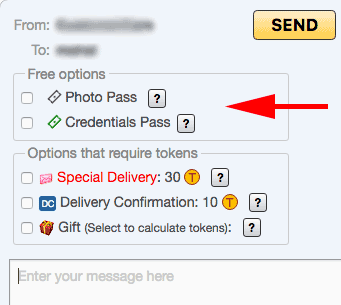
Viewing with a
Recipients who receive your Photo Pass will see (at the top of the message you've sent) a button to view your Private Gallery photos:
Rescind a
Visit from the top menu: Profile Lists Passes, or alternately,
-
Find the Photo Pass containing message in your Mailbox Sent folder. Messages containing a Photo Pass are tagged with the
icon. - Click the message.
-
Click the Rescind
Photo Pass button below the message (bottom left). You'll then be given a choice of which Photo Passes to rescind - one, all to a user, or all sent to anyone.
Credentials Gallery
Fraud has become too common on the Internet. Many social networking sites have attempted to address this issue in various ways. MassageExchange.com has addressed member verification via optional* (and free) Credentials. Credentials are documents that verify identity, training, or professional status; see Credential Categories below.
Credential Categories
Credentials fall into one of these categories:
| Credential Type | Document(s) | Minimum Details |
|---|---|---|
| Identity |
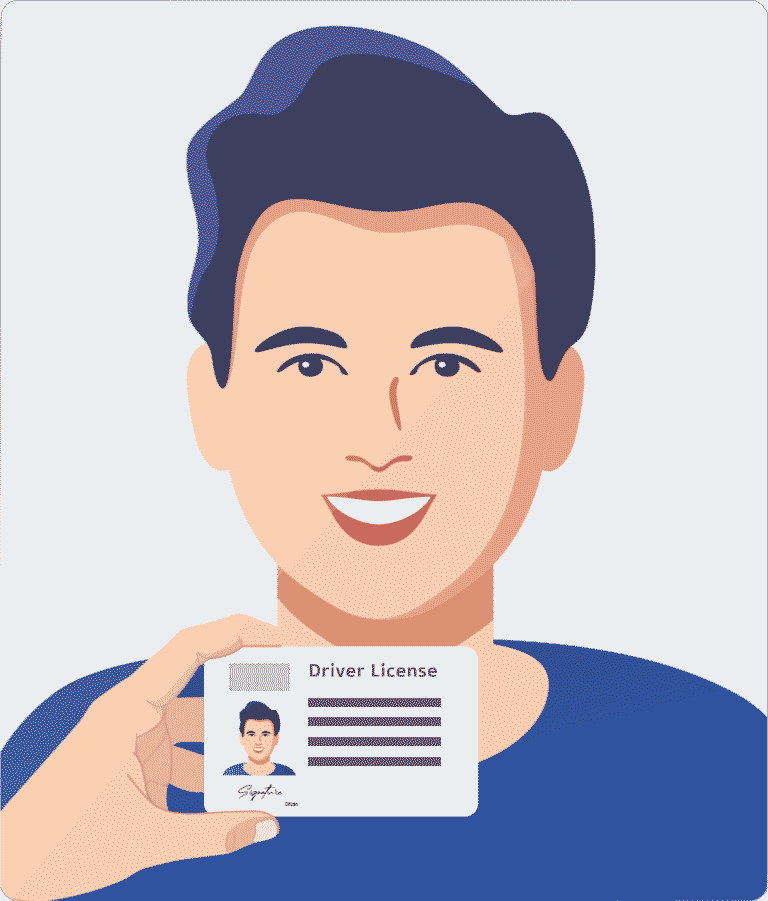
Headshot holding:
• Driver License
• Passport/Passport Card • State Photo ID Card • Military Photo ID Card • Tribal Photo ID Card |
Please see
Instructions
|
| Professional/ Student |
• Bodywork Diploma • Certificate of Completion • Massage Therapist License • Student Transcript • Student ID • Student Enrollment Certificate |
Professional
 Student
Proof of student status is any official document verifying your active enrollment at the bodywork school. Common forms include an enrollment certificate from the school, a current class schedule (including your name as an enrollee), a dated student ID, an official transcript. All such documents must be dated and include your full name and the bodywork school name.
|
| Non-bodywork Diploma | • Diploma • Certificate of Completion |
|
| General | • Business Card • Vaccination Card |
 |
Bodywork Students/Therapists
A Professional Credential is necessary to verify your status. New Student/Therapist accounts will be classified as Enthusiast until a Professional Credential is uploaded to one's Credentials Gallery. Identity and/or General Credentials are optional.
Privacy
Our staff will review your credentials to verify your status, however your Credentials Gallery is otherwise private. If you have privacy concerns, do not share your Credentials with other members, or, perhaps, only with those you trust.
Verification Tags
Members with approved credentials will show these verification icons next to their username:
| Identity Verified | Identity verified by uploading a driver license or similar document | |
| Professional Status Verified | Formal bodywork training and/or their bodywork therapist credentials verified by uploading one or more official documents (diplomas, etc.) |
Requesting Credentials
In a member's detailed profile, click the button Request Identity Credentials near the bottom of their Personal Information section.Sharing Credentials
- Following an Identity Credential or Professional Credential upload, our staff will verify your account. For your privacy, sharing your Identity Credential or Professional Credential with fellow members is not required to verify your account.
- As already mentioned above, do not share any credentials containing a drivers license or passport number, your social security or similar number, your signature, your birthday day/month, or your street address.
- Do not share your Identity Credential with anyone you deem suspicious, or if our website has tagged the member with a suspicious or other such alert at the top of their profile.
A Credentials Pass can only be sent with an e-mail. Viewing a sender's Credentials Gallery requires the same permissions as reading their e-mail: ① the sender or viewer must be , or ② both are , or ③ the Credentials Pass was sent with a T-mail.
Viewing Credentials
Recipients who receive your
Primary Photo
Primary Photo Requirements
- A Head-Shot - head, neck, shoulders - solo for individuals, or both members for couples, no others. Face must fill about ½ - ⅔ the image, as in a drivers license or company ID.
- Face predominantly forward and nothing cut off, excessively dark/blurry, nor obscured by hands/clothing
(avoid
sunglasses
, hats , medical masks , etc.) - Square or portrait ; not landscape .

Which are suitable as a Primary Photo?
Only the last! Hover over them (or tap them) to see explanation.





Selecting / Creating a Primary Photo
One of two buttons will appear below each thumbnail image:| ☆ Set as Primary Photo | The image is pre-approved as a Primary Photo. Click to select this image as your Primary Photo. |
| Not approved as a Primary Photo (yet). If the face is large enough and unobscurred, click to crop the image to create a head shot. | |
|
|
|
Uploading Photos
MassageExchange.com photo uploading is similar to the steps you take to e-mail a photo.
On desktops and tablets, you may also click My Photos/Credentials on your home page Quicklinks panel.
| Standard Gallery | default Standard photos are visible to all members |
| Private Gallery | Private photos are viewable by permission only.
You must send a
|
| Credentials Gallery | Credentials are viewable by permission only.
You must send a
|
Photo Operations
| Photo Operations | |
|---|---|
| Calls our photo editor to allow you to trim ("crop") the photo. Handy for making a head shot from an existing photo, or just trimming out extraneous material. | |
| Rotate | Rotate photo. Options are 90° counter-clockwise, 90° clockwise, 180° clockwise. |
| Duplicate | Make a copy of the photo, perhaps because you want to make a cropped version and keep the original. |
| Move | Move the photo to another Gallery. |
| Delete | Deletes the Photo |
| Delete Primary Photo | Click the Delete Primary Photo button, which appears below the Primary Photo,
to delete the Primary Photo.
Note: You need not delete your Primary Photo if you simply wish to replace it with another.
For replacing your Primary Photo, simply select a new gallery photo via either button below any gallery photo: ☆ Set as Primary Photo, or |
Helpful Utilities
- HEIC to JPG Image converter:
- https://heictojpg.com
- PDF to JPG Image converter:
- https://www.freepdfconvert.com/pdf-to-jpg
- Cropping Information
-
We offer an online cropping tool in your MassageExchange.com gallery, but sometimes you may prefer an external tool. Additional cropping resources: